Recommended Free Template use in dreamweaver cs6
These are all simple and nice template
There are free of charge
As a student, it really helps me a lot.
1.FREE DREAMWEAVER TEMPLATES ORG
2.DREAMWEAVER CLUB
3.DREAMWEAVER TEMPLATES
Sunday, 5 June 2016

STRUCTURED QUERY LANGUAGE
when talk about SQL, you are not strange to it.
So, have a revision of what is SQL?
SQL is a standard computer language for accessing and manipulating database.
SQL - DML - SELECT, UPDATE, DELETE, INSERT INTO (this is all data)
- DDL - CREATE TABLE, ALTER TABLE, DROP TABLE, CREATE INDEX, DROP
INDEX (this is all table)

when talk about SQL, you are not strange to it.
So, have a revision of what is SQL?
SQL is a standard computer language for accessing and manipulating database.
SQL - DML - SELECT, UPDATE, DELETE, INSERT INTO (this is all data)
- DDL - CREATE TABLE, ALTER TABLE, DROP TABLE, CREATE INDEX, DROP
INDEX (this is all table)

Advantage of using database to store web data
1. access faster
2. better concurrent access
3. easy change to data and scripts
4. increased security
Sunday, 3 April 2016

PHP
PHP Server Side Script
PHP is open source.
Open source? can modify, can share.
PHP produce output of HTML
only can see HTML
In variable, case sensitive
must same font, if not will error
PHP Syntax
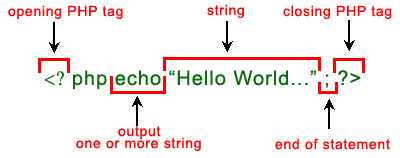
PHP Operators
1. Arithmetic

2. Comparison

3. Logical

PHP Conditional
1. if
2. if else
3. if else if
4. switch-case

 PHP Looping
1. for
2. while
3. do-while (at least 1 loop)

PHP is open source.
Open source? can modify, can share.
PHP produce output of HTML
only can see HTML
In variable, case sensitive
must same font, if not will error
PHP Syntax
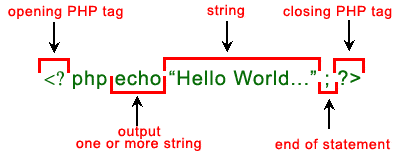
PHP Operators
1. Arithmetic

2. Comparison

3. Logical

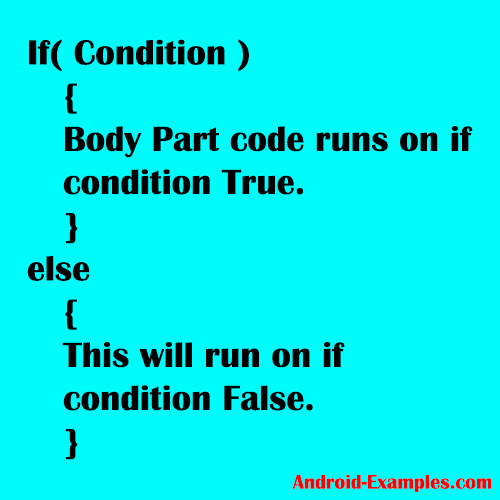
PHP Conditional
1. if
2. if else
3. if else if
4. switch-case

1. for
2. while
3. do-while (at least 1 loop)

Java Script

JavaScript is a programming language used to make web pages interactive. It runs on your visitor's computer and doesn't require constant downloads from your website. JavaScript is often used to create polls and quizzes (Stephen Chapman, 2016).
Java Script syntax

CSS
Cascading Style Sheet

HTML is for content, then CSS is for PRESENTATION.
more clear explanation, CSS is to beautify.
Why CSS?
1. allow for much richer document appearances than HTML
2. reduce workload in HTML.
3. use same style on multiple pages.
4. reduce page download size.
CSS Syntax

Selector - elements on HTML page.
Ways of inserting CSS into HTML
1. External Style Sheet
2. Internal Style Sheet
3. Inline Style
4. Mix all three of the methods listed in above.
CSS selectors


HTML is for content, then CSS is for PRESENTATION.
more clear explanation, CSS is to beautify.
Why CSS?
1. allow for much richer document appearances than HTML
2. reduce workload in HTML.
3. use same style on multiple pages.
4. reduce page download size.
CSS Syntax

Selector - elements on HTML page.
Ways of inserting CSS into HTML
1. External Style Sheet
- style apply to many pages.
- change the look of entire Web site by changing only one file. <<<advantage
- <link>
2. Internal Style Sheet
- single document have unique style
- have to edit one by one <<<disadvantage
- inside the <head>
3. Inline Style
- loses many advantages of style sheets by mixing content with presentation
- use the style attribute in the relevant tag.
- <p> </p>
4. Mix all three of the methods listed in above.
CSS selectors

Friday, 11 March 2016
HTML of the day (2)
Some part of HTML - part 2
Here we go for the part 2 of HTML which is learn about how to create a form.
Since our lecturer need us to do a lab exercise and submit on spot, I just share what code I created.


Here we go for the part 2 of HTML which is learn about how to create a form.
Since our lecturer need us to do a lab exercise and submit on spot, I just share what code I created.
I used to practice HTML in click here to practice
<!DOCTYPE html>
<html>
<head>
<title>Page Title</title>
</head>
<body>
<h3> Registration Form : Dance Club </h3>
<form action="insert.asp" method="post">
<hr>
<table border="2" align="left" width="30%">
<tr>
<td><b>Name:</b></td>
<td><INPUT type="text" name="yourname" size=30 maxlength=60>
</td>
</tr>
<tr>
<td><b>IC No:</b></td>
<td><INPUT type="text" name="icnumber" size=6 maxlength=6>-
<INPUT type="text" name="icnumber" size=2 maxlength=2>-
<INPUT type="text" name="icnumber" size=4 maxlength=4>
</td>
</tr>
<tr>
<td><b>Address:</b></td>
<td><TEXTAREA name="address" rows=5 cols=60></TEXTAREA>
</td>
</tr>
<tr>
<td><b>Gender:</b></td>
<td><INPUT type="radio" name="gender" value="male">Male
<INPUT type="radio" name="gender" value="female">Female
</td>
</tr>
<tr>
<td><b>Dance Type:</b></td>
<td>
<INPUT type="checkbox" name="dancetype" value="zapin">Zapin
<INPUT type="checkbox" name="dancetype" value="joget">Joget
<INPUT type="checkbox" name="dancetype" value="inang">Inang
<INPUT type="checkbox" name="dancetype" value="liondance">Lion Dance
</td>
</tr>
<tr>
<td><b>Competition:</b></td>
<td>
<SELECT name="competition" size=3>
<OPTION>State Level
<OPTION>National Level
<OPTION>StateInternational Level
</td>
</tr>
<tr>
<td><b>Nationality:</b></td>
<td>
<SELECT name="nationality">-please select
<OPTION>-please select
<OPTION>Malaysian
<OPTION>Non-Malaysian
</td>
</tr>
<tr>
<td><b>Password:</b></td>
<td>
<INPUT type="password" name="pwd" size=15 maxlength=15
</td>
</tr>
</table>
<INPUT type="Submit" value="Register Me">
<INPUT type="Reset" value="Cancel">
</form>
</body>
</html>
So the result should be

So far, what I highlight in creating HTML form is..
Firstly, just categories what type of input you want to create.
Just like the example above.
Name, IC No - TEXT
Address - TEXTAREA
Gender - radio button
Dance Type - check box
Competition - SELECT
Password - password
My step is first create the table, I put all the question in the form such as name, IC No, Address.... creating the columns and rows.
After I done all the formation of the form then I only insert the type of input coding into each column.
It is easier for me and reduce the confusion.
Need a more clear tutorial?
This video may help you build your basic of HTML form.
Subscribe to:
Posts (Atom)